

Start at the End
Your customer sees a payment form. They enter their card. They click “Pay.” They see a confirmation. That’s it. That’s what you’re building toward. Everything else is infrastructure to make that moment happen reliably, securely, and at scale.
Key Terms
Before we go further, let’s define a few concepts you’ll see throughout these docs:The Form: The Payments Library Is the Answer
The Payments Library is Orchestra’s answer to card capture: it is the form. You embed our JavaScript. When the user clicks “Pay,” a popup overlay appears over your page (your site grays out behind it). They enter card details in that popup. You receive the payment result and, optionally (if selected), a token for the card in a callback. You can store the card with Orchestra or with the payment gateway directly. Card data never touches your servers, which is what keeps you out of PCI scope.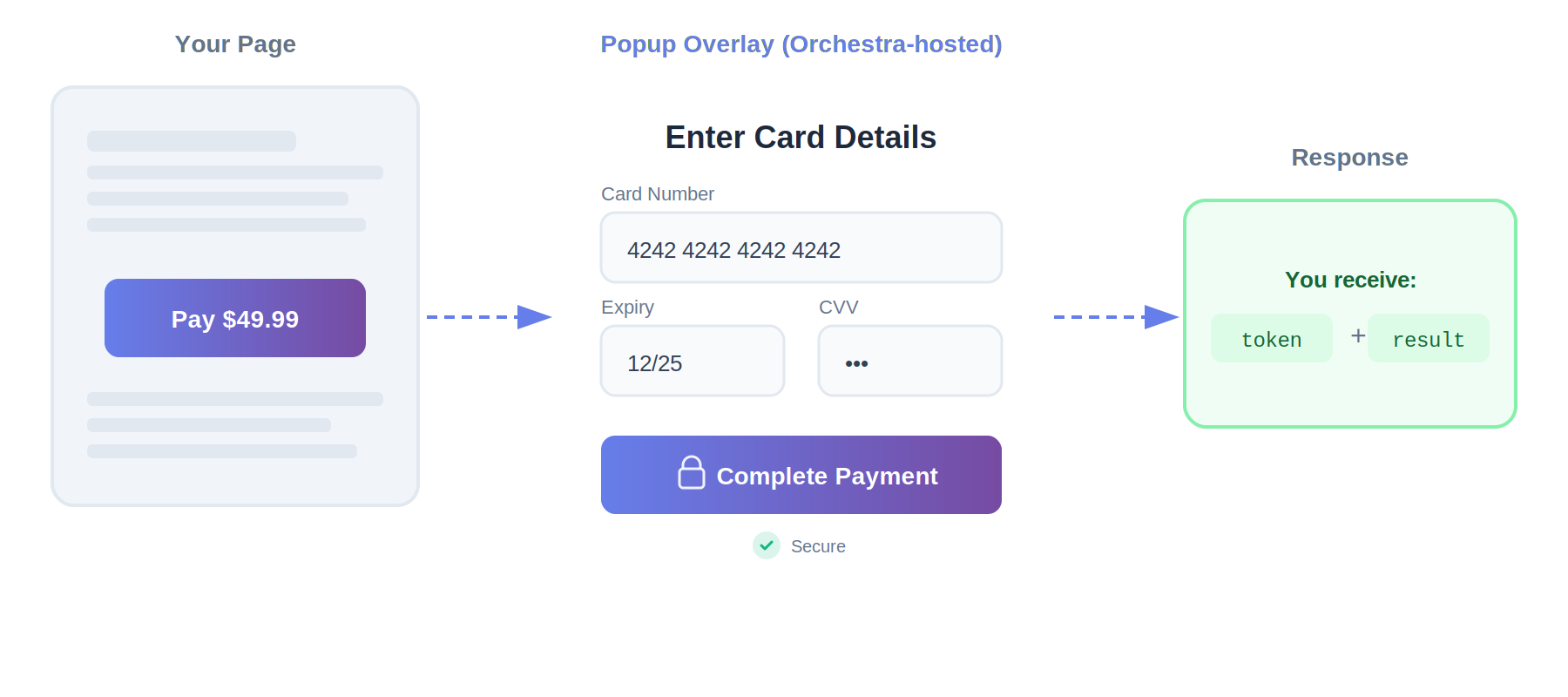
Once the Library has captured a token, the REST API takes over: charging that token, authorizing and capturing, refunds, voids, recurring billing, and transaction status. That is the standard integration, and it’s what the rest of this guide, and the REST API reference, assume.
Can you build your own form and post raw cards through the REST API instead? The schema allows it: the charge endpoint accepts raw card fields as well as token references. But building your own card form means cardholder data passes through your frontend and backend, which puts you in PCI DSS scope. It’s possible, not the intended integration, and worth doing only if you already have a specific reason to hold card data yourself (an existing token vault provider, for example).
How the Library and API work together: API vs Library
What Payment Methods Can You Accept?
Beyond traditional card payments, the Payments Library gives you access to multiple payment methods that your customers might prefer:
One of the benefits of this approach is consistency: the same callback receives results regardless of which payment method your customer chooses. Your integration code stays the same whether they paid with a Visa card, Apple Pay, or PayPal.
Need a payment method we don’t support yet? We can add new payment methods at no cost to you. Contact us to discuss your requirements and timeline.
Behind the Form: What Actually Happens
When the customer clicks “Pay”: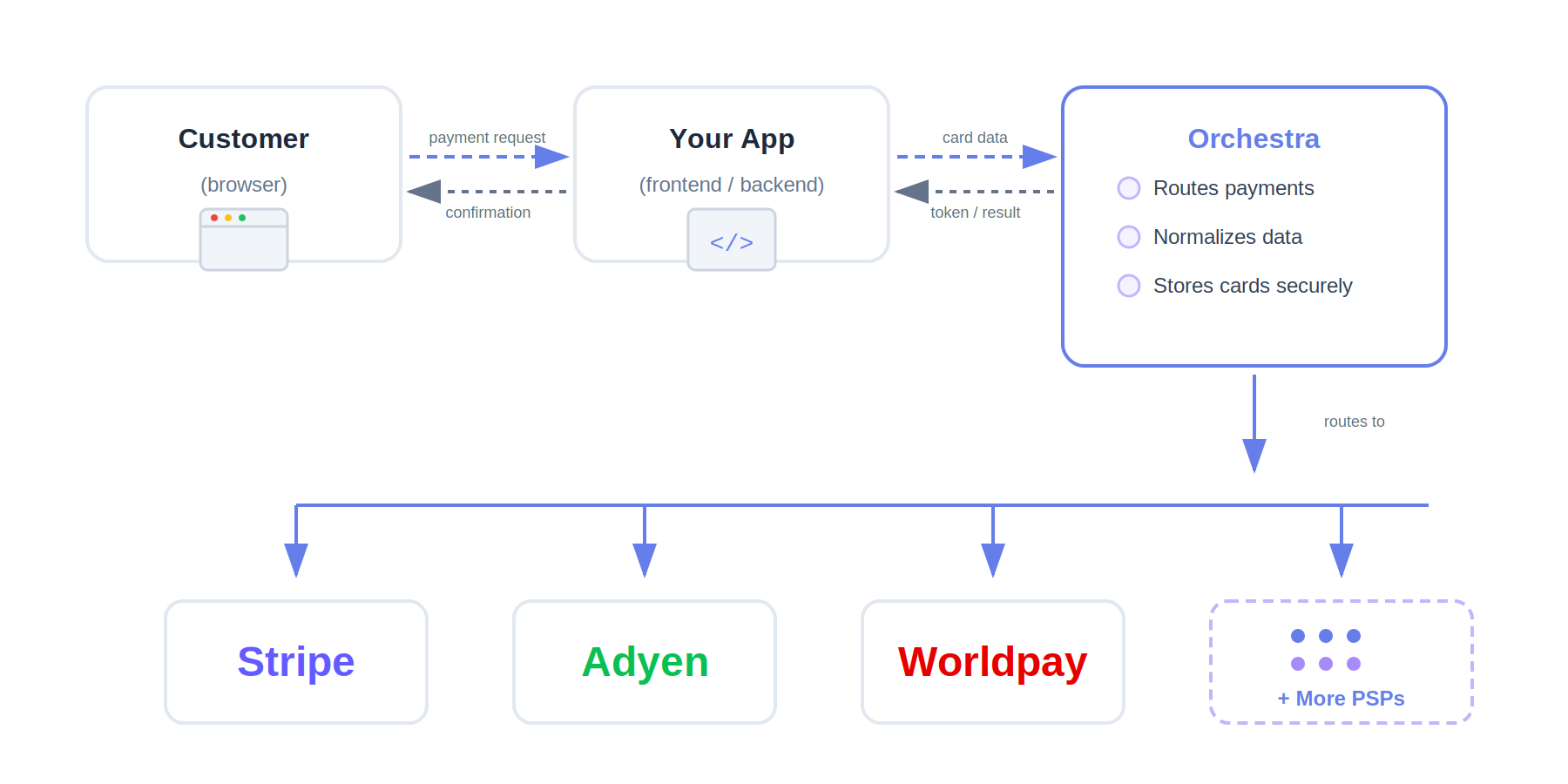
The orchestration advantage: This unified API is why you can switch from Stripe to Adyen by changing one parameter instead of rewriting your integration. The same request format works across all supported providers.
The Payment Lifecycle
When you’re ready to collect money from a customer, you have two approaches to choose from, depending on your business needs: 1. Charge (and optionally tokenize) - This is the straightforward approach: authorize and capture (an optionally tokenize) in one step, and money moves immediately. You’ll use this when you can fulfill the order right away, like with digital goods, subscription signups, or in-person purchases. 2. Authorize → Capture - This two-step approach lets you reserve funds now and collect later. It’s perfect for situations where you need some time before fulfilling the order, like shipping physical goods, hotel check-outs where the final amount might vary, or any scenario where you want to hold funds before finalizing the charge.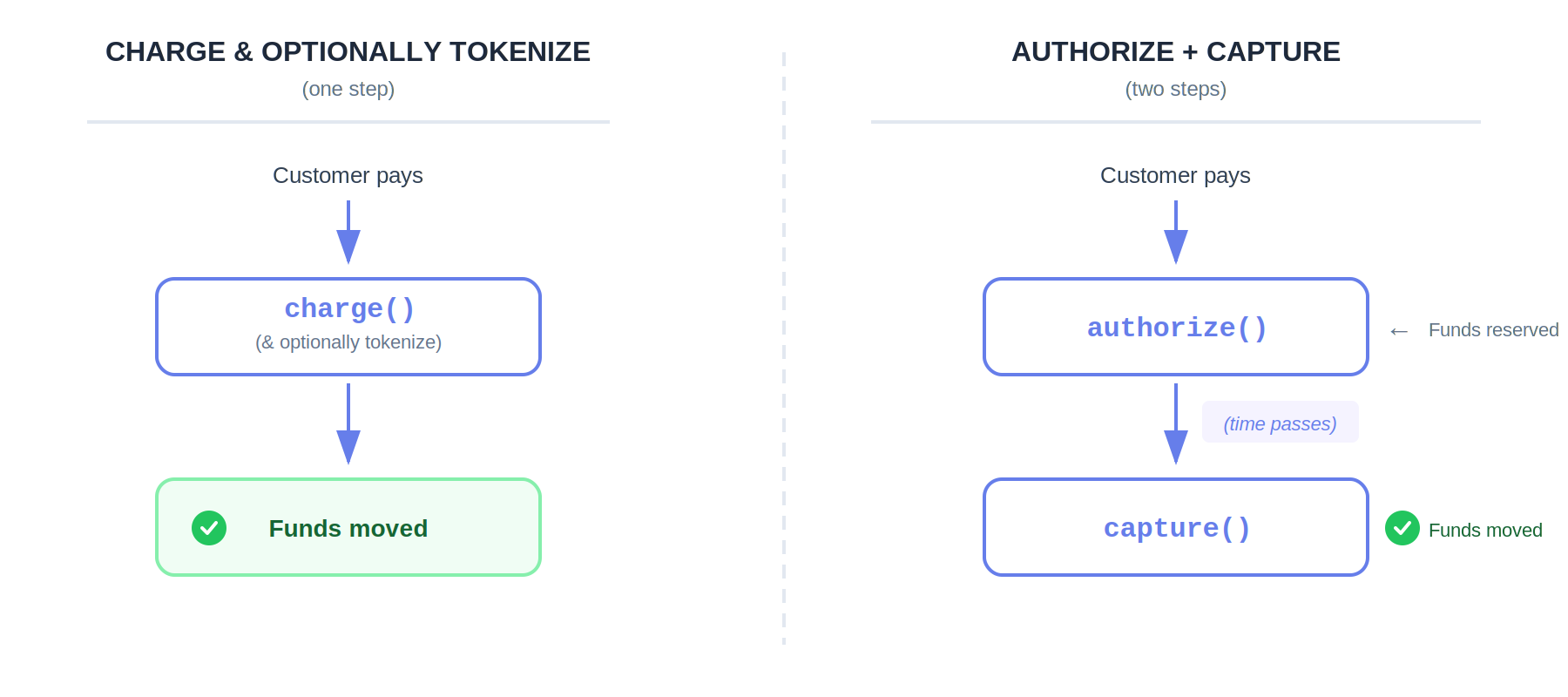
Why Multiple Gateways?
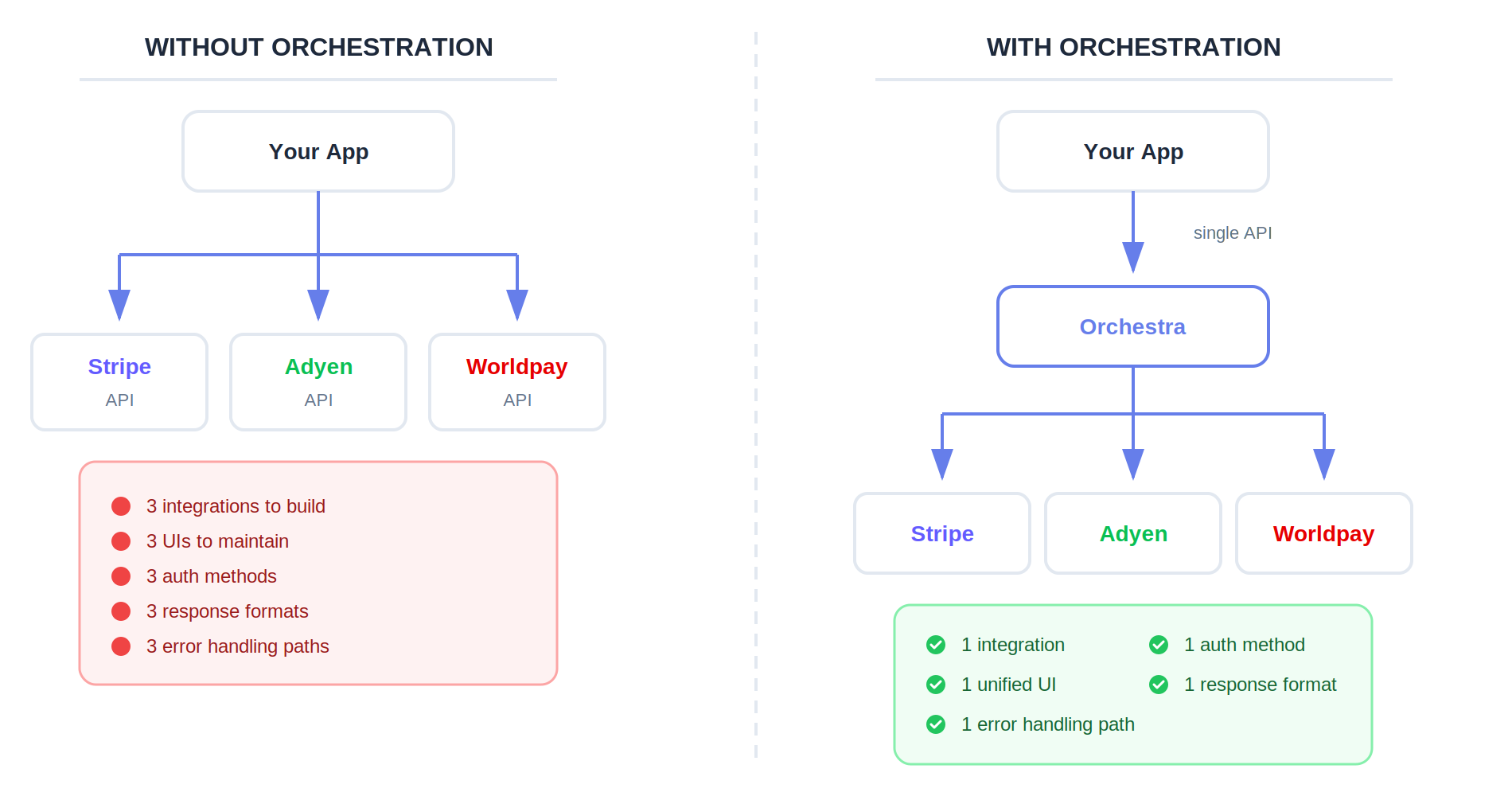
Here’s an important point upfront: if you’re only using one payment gateway, you should integrate with them directly. Stripe’s API is excellent, Adyen’s dashboard is powerful, and direct integrations are often the right choice when you only need one provider. We’re not trying to compete with single-gateway integrations. Orchestra becomes valuable when your business needs multiple gateways working together:
The orchestration value: One integration that speaks to all of them.
Challenges Orchestra Helps You Overcome
Here’s where multi-gateway payment integration gets complicated - and how Orchestra helps:Challenge: Gateway goes down, you lose sales When your payment gateway has an outage, every transaction fails and you lose sales. Orchestra helps you build resilience by supporting automatic sequential failover:
Challenge: Storing cards securely (PCI DSS compliance) Handling raw card numbers puts you in PCI DSS scope (the security standard governing how businesses handle cardholder data). Options:
*We can provide guidance prepared by our auditors on how to fill out the SAQ-D for service providers when using Orchestra.
The less card data you handle, the simpler your compliance. Full Outsourcing (via the Payments Library) is the easiest path.
Challenge: You want routing control, not a black box Some payment orchestrators make routing decisions for you using their own rules engine. That’s not how Orchestra works, and we consider this a competitive advantage. When you use someone else’s routing rule engine, you’re constrained by the types of rules and logic that they thought of. That might cover most cases, but who’s to say your business fits that category? With Orchestra, you set up your own rules based on your own logic and criteria. You’re not limited by someone else’s assumptions about how routing should work - you have complete flexibility to implement exactly what your business needs.
The Infrastructure You’ll Need
Before you can start processing payments through Orchestra, you’ll need to set up a few pieces of infrastructure:- Payment gateway accounts - You’ll need relationships with actual payment gateways like Stripe, Adyen, Worldpay, or others to process payments. Orchestra routes transactions to these providers, but doesn’t replace them.
- Gateway credentials stored in Orchestra - Once you have accounts with your chosen processors, you’ll store each processor’s API keys with Orchestra. This lets you reference them by name in your API requests rather than managing credentials in your own code.
- Orchestra API key - Finally, you’ll need an API key from Orchestra to authenticate your requests to our platform.
Orchestra uses major currency units (49.99), not minor units/cents (4999). If your payment gateway works in minor units, Orchestra converts automatically from major to minor units - keeping your requests to Orchestra consistent across all payment gateways.
cardToken come from?
The Payments Library: the hosted popup returns it in your callback after the customer enters their card. (A /tokenize REST endpoint also exists for backends that already lawfully hold card data, but sending raw card details through your own systems puts you in PCI DSS scope and is not the standard integration.)
Once the Library has produced a token, your backend never handles raw card numbers. Tokens are gateway-agnostic. The same token works across all your configured gateways.
Saving Cards for Future Charges
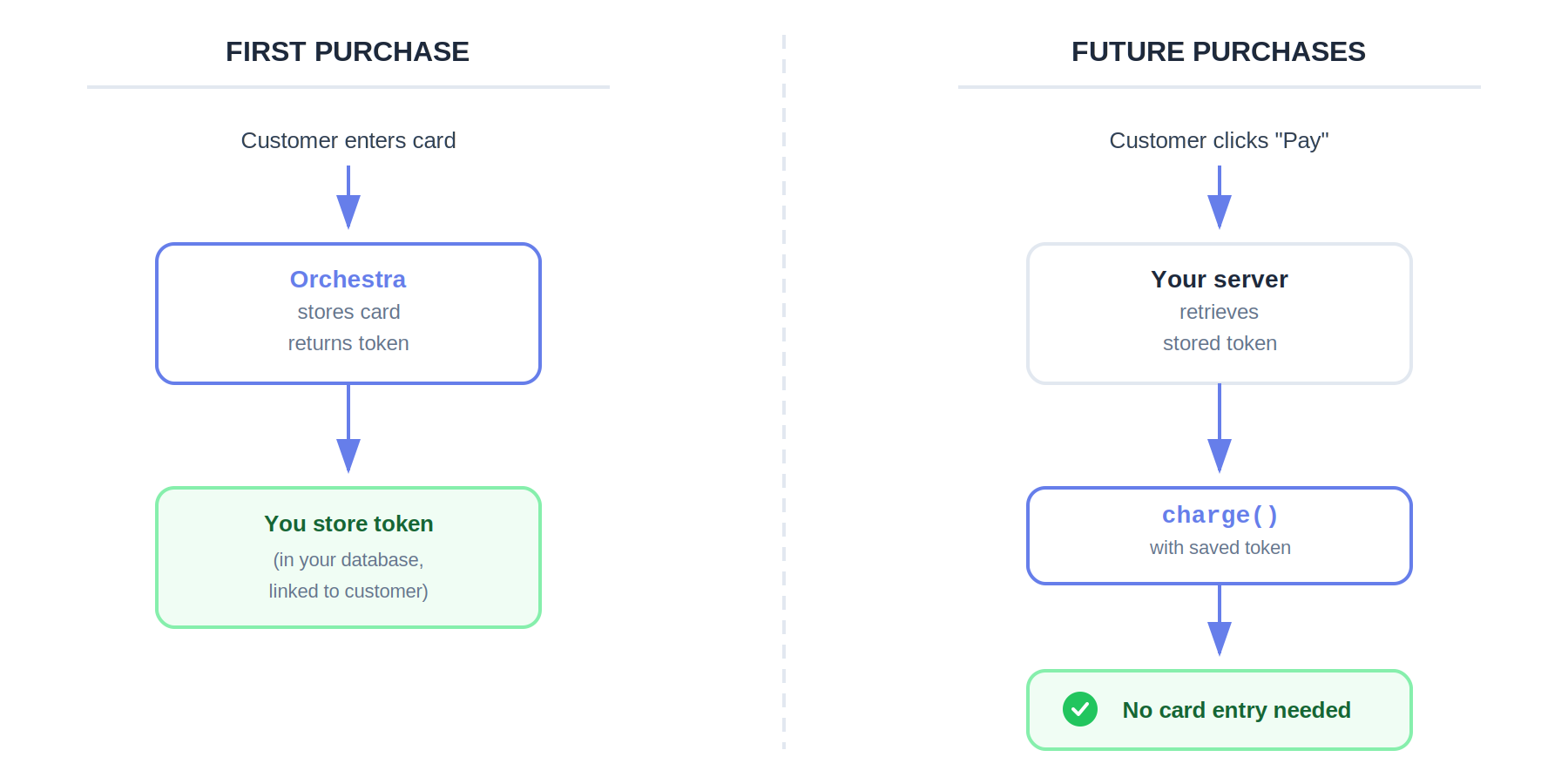
Many businesses need to charge customers multiple times without asking for card details again. This comes up in scenarios like subscriptions, repeat customers, or one-click checkout experiences.
When a customer enters their card for the first time through the Payments Library, you can store it with Orchestra and receive a token back. You save that token in your database linked to the customer, and then use it for all future charges. Your customer never has to re-enter their card details.
What Orchestra Doesn’t Do
To set clear expectations, here’s what Orchestra isn’t designed to do:- Generally not a payment processor - Orchestra typically doesn’t process payments itself. You’ll need merchant accounts with payment processors, and Orchestra routes transactions to them on your behalf. However, we can provide payment processing services through agreements with our US and EU partners where that makes sense for your integration.
- Not a single-gateway replacement - If you only need one payment gateway like Stripe, you should use Stripe directly. Orchestra adds value when you need to work with multiple providers.
- Not a fraud engine - For fraud detection and prevention, you’ll want to use your payment gateways’ built-in fraud tools or dedicated fraud prevention services. Orchestra passes through fraud-related data but doesn’t make fraud decisions. However, we can integrate with external fraud services on demand.
- Not a reconciliation system - While Orchestra returns transaction references that you can use for reconciliation, the actual reconciliation of funds happens in your payment processor dashboards. However, we can add reconciliation capabilities on demand.
- Not a rules engine - Orchestra doesn’t provide a drag-and-drop UI for configuring routing rules. Your routing logic lives in your application code, where you have full control and flexibility.
Clear boundaries: Orchestra is primarily a routing and translation layer between your application and payment processors. You typically need your own processor accounts, fraud tools, and reconciliation systems. We handle the integration complexity, though we can also provide payment processing services through partnerships where appropriate.
Ready to Build?
At this point, you should have a solid understanding of how payment orchestration works and how Orchestra implements it. You’ve learned about the customer experience you’re building toward, how the Library and the API work together, how payment operations flow, and the infrastructure you’ll need to get started. You also understand when Orchestra makes sense (multiple gateways) and when it doesn’t (single gateway), along with the key challenges it helps you overcome around failover, PCI compliance, and routing control. Ready for your next step? Let’s build a working charge in 5 minutes.Quickstart
First API call in 5 minutes